
REAL DATA · EIGHT ORIGINAL PHOTOGRAPHS · TWO MATCHING SETS
From the original photograph to a traceable comparison.
A complete practice run with supplied metadata, five spots per target colony, image QC, matched coefficients, saved tables and publication-format exports.
Start here after installing FunMel. For your own photographs, use the Get started workflow; this article uses eight fixed example filenames and their supplied design. Run numbered steps in order; all objects used below are created in this article. The figures and tables shown here use the bundled photographs. The function catalog covers specialist tools separately.
What this experiment contains
Each matching set has one independent control plate and three independent confrontation plates. Each plate has four target Zymoseptoria tritici colonies. Confrontation plates also contain a central fungus and connected hyphal growth; control plates do not. The central growth is not an inhibition zone.
| Matching set | Independent plate image | Role | Replicate |
|---|---|---|---|
| A60_2_14_days | 2026_10_02_99_38.JPG | A60_2 confrontation | 1 |
| A60_2_14_days | 2026_10_02_99_39.JPG | A60_2 confrontation | 2 |
| A60_2_14_days | 2026_10_02_99_40.JPG | A60_2 confrontation | 3 |
| A60_2_14_days | 2026_10_02_99_41.JPG | Own-set control | 1 |
| B20_2_14_days | 2026_10_02_99_42.JPG | B20_2 confrontation | 1 |
| B20_2_14_days | 2026_10_02_99_43.JPG | B20_2 confrontation | 2 |
| B20_2_14_days | 2026_10_02_99_44.JPG | B20_2 confrontation | 3 |
| B20_2_14_days | 2026_10_02_99_45.JPG | Own-set control | 1 |
The folder-derived labels are teaching labels whose biological
identities and assignments must be checked against laboratory records.
The supplied source field fungus="hm83" is retained without
assigning an unverified biological role. Unrecorded strain/medium fields
remain blank. The eight original JPEGs are unchanged. No separate image
download is required.
1. Locate the photographs and create one practice project
library(FunMel)
photos14 <- system.file("extdata","14-days",package="FunMel")
stopifnot(nzchar(photos14))
project_dir14 <- tempfile("FunMel_14_day_project_")
project14 <- prepare_experiment(photos14,project_dir14)
tempfile() supplies a new temporary folder
name, so this teaching run does not overwrite earlier work. Its
files last only as long as the temporary location remains. For a project
you want to keep, replace that assignment before
starting with a new durable folder, for example:
# Alternative to tempfile(): keep the bundled practice project in your home folder.
project_dir14 <- file.path(path.expand("~"), "FunMel_14_day_project")
if (file.exists(file.path(project_dir14, "project.rds"))) {
  project14 <- load_experiment(project_dir14)
} else {
  project14 <- prepare_experiment(input=photos14, project_dir=project_dir14)
}
project_dir14 is the output folder, not the input ZIP.
To analyze your own ZIP, use the separate input/output example in Get started.
Do not run both preparation alternatives for the same project. To revisit work already saved, go directly to step 8. A folder or ZIP is passed directly here; there is no file chooser and no opportunity to select a QC image accidentally.
project14$project_dir   # All output files.
project14$metadata_file # Project copy of the experimental design.
project14$qc_dir        # QC PNGs created by the image run.
2. Check the supplied metadata
The combined metadata is discovered automatically. Inspect it before measuring:
metadata14 <- read.csv(project14$metadata_file,check.names=FALSE)
knitr::kable(metadata14[c("plate_id","set_id","treatment","centre_model","replicate")],
row.names=FALSE)| plate_id | set_id | treatment | centre_model | replicate |
|---|---|---|---|---|
| 2026_10_02_99_38 | A60_2_14_days | A60_2 | fungus | 1 |
| 2026_10_02_99_39 | A60_2_14_days | A60_2 | fungus | 2 |
| 2026_10_02_99_40 | A60_2_14_days | A60_2 | fungus | 3 |
| 2026_10_02_99_41 | A60_2_14_days | control | none | 1 |
| 2026_10_02_99_42 | B20_2_14_days | B20_2 | fungus | 1 |
| 2026_10_02_99_43 | B20_2_14_days | B20_2 | fungus | 2 |
| 2026_10_02_99_44 | B20_2_14_days | B20_2 | fungus | 3 |
| 2026_10_02_99_45 | B20_2_14_days | control | none | 1 |
Each control appears once, labelled treatment="control"
and centre_model="none". Each confrontation uses
centre_model="fungus". All four plates in a matching group
share their set_id. A60_2 never uses B20_2’s control or
vice versa. replicate is numbered within a treatment and
set; it does not by itself pair a treatment plate with a uniquely
replicated control. With one control in a set, its mean is the shared
denominator for the three treatment plates.
Verify treatment identities, controls, sets, day and any recorded strain/medium. Correct missing or inaccurate information. Additional user-defined columns are preserved. Do not infer biological identities from a filename alone. If corrections are needed, edit the project CSV and save it before matched comparisons. Do not change image identity or layout after analysis without remeasuring.
3. Set calibration and measure all eight plates
In this example, 90 is an illustrative outer
dish diameter, not a verified physical measurement of these
photographs. Replace it with the actual outer diameter for scientific
use. Do not paste subsequent R commands into a readline()
prompt; this workflow sets the number directly.
dish_mm <- 90
result14 <- run_experiment(
  project14,dish_diameter_mm=dish_mm,max_dim=1200,
  n_spots=5,spot_radius_mm=0.4,n_boot=20
)
result14$analysis_status
#> [1] "complete"
result14$failed
#> [1] file  error
#> <0 rows> (or 0-length row.names)
stopifnot(nrow(result14$failed)==0L)
The expected status is "complete"; the failure table has
zero rows. This saves image_analysis.rds, measurement CSVs
and a QC PNG for each plate. A genuine failed image must be corrected
before finalization. Success does not certify segmentation or biological
accuracy.
| Setting | Meaning in this tutorial |
|---|---|
dish_diameter_mm |
Outer diameter used to convert pixels to millimetres |
max_dim=1200 |
Longest working-image dimension; influences spatial resolution |
n_spots=5 |
Request five additional circular regions within each target colony |
spot_radius_mm=0.4 |
Radius of each spot, not its diameter |
n_boot=20 |
Quick teaching setting for spatial-block bootstrap summaries, not precise uncertainty |
Whole-colony MI uses eligible interior pixels, excluding the rim and saturated/specular pixels. Spots add a deterministic, spatially spread sample; they do not replace whole-colony measurements. Omit spot settings for whole-colony measurements alone. Use consistent settings across comparable plates.
data.frame(plates=nrow(result14$plates),colonies=nrow(result14$colonies),
           spots=nrow(result14$spots),failed=nrow(result14$failed))
#>   plates colonies spots failed
#> 1      8       32   160      0
4. Inspect masks, spots and illumination
Inspect all eight QC images in project14$qc_dir. The
examples below show one confrontation and its own control; they do not
replace reviewing the remaining photographs.
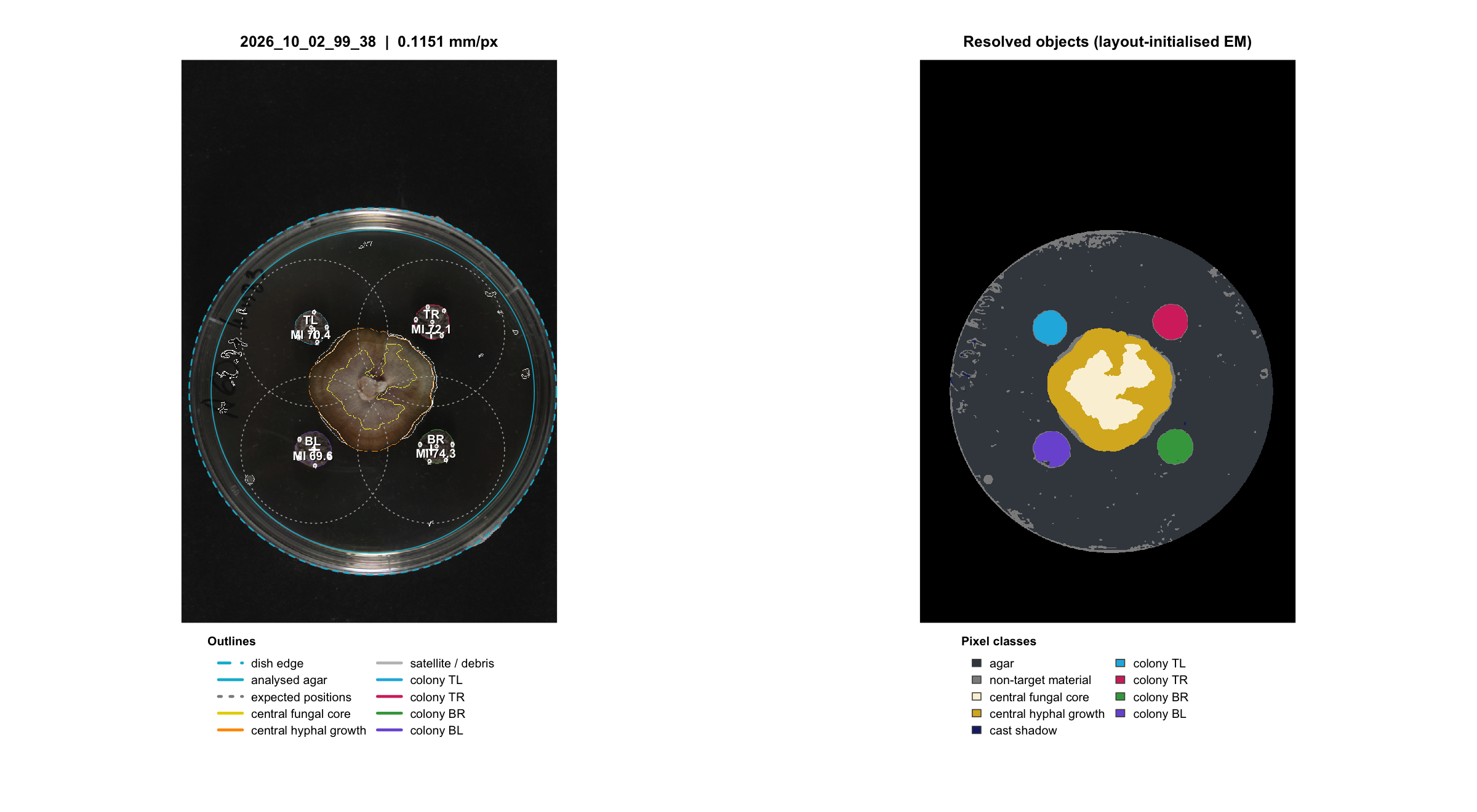
Example QC: a confrontation plate and its own matching control. Inspect the target outlines, spot locations, central fungal tissue/hyphae and dish calibration on every image.
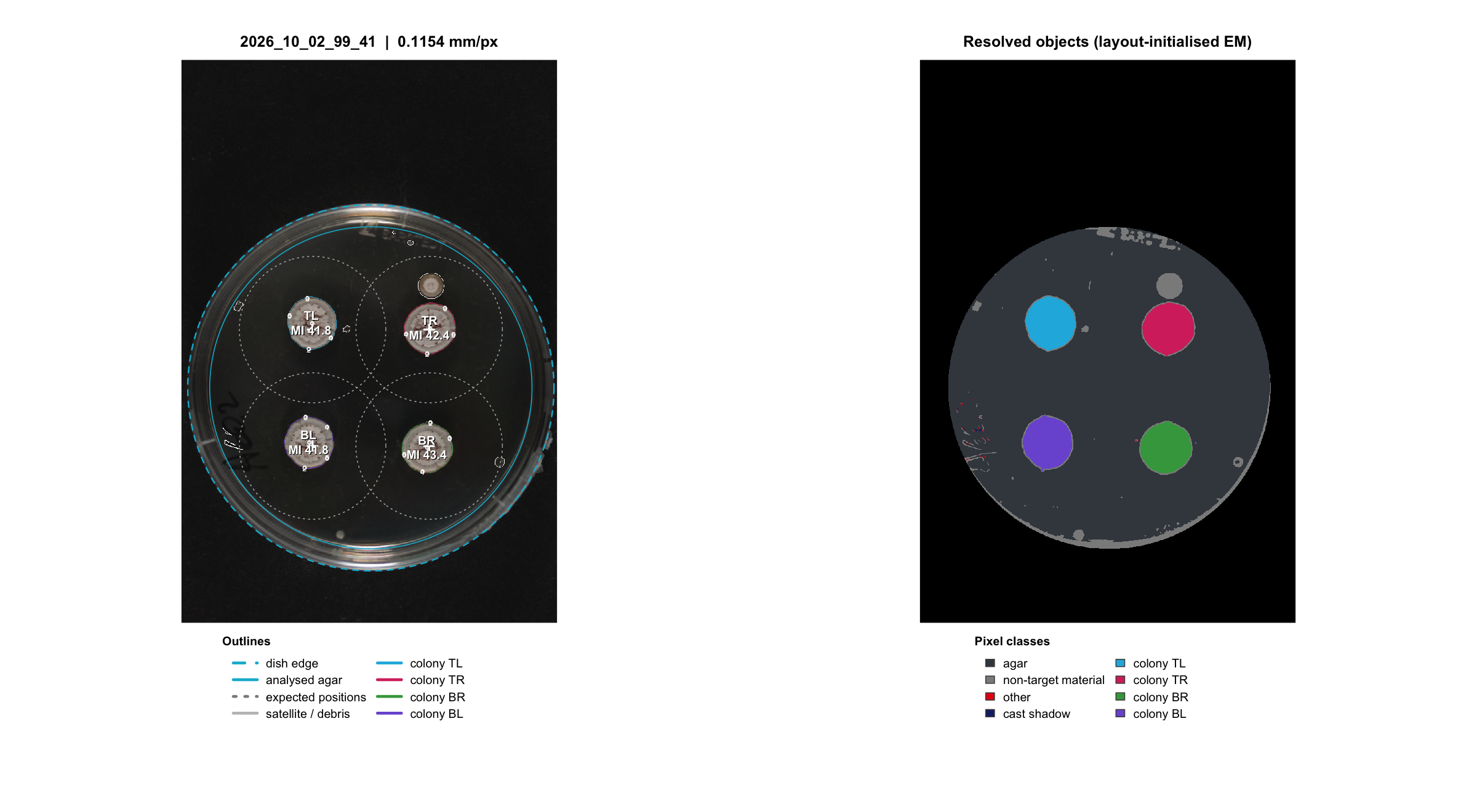
Example QC: a confrontation plate and its own matching control. Inspect the target outlines, spot locations, central fungal tissue/hyphae and dish calibration on every image.
Check target-colony boundaries, central tissue/hyphal separation, spot containment, dish edge, shadows, glare and warning text. The approximately round targets need not have perfectly circular outlines. Correct unsuitable images or measurements before interpreting the final comparisons.
fields14 <- c("plate_id","n_colonies_detected","central_detected","flat_field_status")
qc_table14 <- result14$plates[intersect(fields14,names(result14$plates))]
missing14 <- setdiff(fields14,names(result14$plates))
if(length(missing14)) cat("Not reported: ",paste(missing14,collapse=", "),
                        "; no values were inferred. Inspect QC before interpretation.\n",sep="")
knitr::kable(qc_table14,row.names=FALSE)| plate_id | n_colonies_detected | central_detected | flat_field_status |
|---|---|---|---|
| 2026_10_02_99_38 | 4 | TRUE | withheld_degenerate_fit |
| 2026_10_02_99_39 | 4 | TRUE | withheld_degenerate_fit |
| 2026_10_02_99_40 | 4 | TRUE | withheld_degenerate_fit |
| 2026_10_02_99_41 | 4 | FALSE | withheld_degenerate_fit |
| 2026_10_02_99_42 | 4 | TRUE | withheld_degenerate_fit |
| 2026_10_02_99_43 | 4 | TRUE | withheld_degenerate_fit |
| 2026_10_02_99_44 | 4 | TRUE | withheld_degenerate_fit |
| 2026_10_02_99_45 | 4 | FALSE | withheld_degenerate_fit |
Read the status recorded in your table.
withheld_degenerate_fit means the fitted illumination
correction did not pass the saturation safeguard and was withheld.
NA or an absent field means not reported,
not that correction was applied or passed. The table explicitly
identifies fields not supplied by the analysis. Inspect the QC images
and repeat measurement if QC information is missing. A withheld
correction is not evidence of adequate illumination.
Treatment/control ratios do not guarantee cancellation of exposure or
lighting differences. Use consistent imaging and a suitable reference;
rephotograph when needed. The figures here illustrate software output,
not a validated melanin-concentration assay.
Console reminders identify image-QC checks. Inspect the QC images before interpreting or reporting results.
5. Inspect whole-colony, spot and profile tables
fields14 <- c("plate_id","colony_id","MI_min","MI_mean","MI_max","MI_spot_mean","n_spots_measured","spot_status")
colony_table14 <- result14$colonies[intersect(fields14,names(result14$colonies))]
knitr::kable(head(colony_table14),digits=2,row.names=FALSE)| plate_id | colony_id | MI_min | MI_mean | MI_max | MI_spot_mean | n_spots_measured | spot_status |
|---|---|---|---|---|---|---|---|
| 2026_10_02_99_38 | TL | 42.26 | 70.45 | 90.67 | 72.00 | 5 | ok |
| 2026_10_02_99_38 | TR | 41.95 | 72.11 | 95.23 | 71.60 | 5 | ok |
| 2026_10_02_99_38 | BR | 53.71 | 74.29 | 94.55 | 71.19 | 5 | ok |
| 2026_10_02_99_38 | BL | 43.64 | 69.64 | 88.77 | 61.21 | 5 | ok |
| 2026_10_02_99_39 | TL | 40.52 | 71.19 | 93.22 | 71.04 | 5 | ok |
| 2026_10_02_99_39 | TR | 34.74 | 68.28 | 93.39 | 64.63 | 5 | ok |
MI = 100 - CIELAB L*; larger values indicate darker
tissue. MI_min and MI_max are observed
whole-colony pixel extrema, not confidence limits.
MI_spot_mean is the mean of the individual spot means. The
corresponding MI_spot_min/max are extrema of spot
means, not pixel extrema.
fields14 <- c("plate_id","colony_id","spot_id","spot_radius_mm","n_pixels","MI_mean","MI_min","MI_max")
spot_table14 <- result14$spots[intersect(fields14,names(result14$spots))]
knitr::kable(head(spot_table14),digits=2,row.names=FALSE)| plate_id | colony_id | spot_id | spot_radius_mm | n_pixels | MI_mean | MI_min | MI_max |
|---|---|---|---|---|---|---|---|
| 2026_10_02_99_38 | TL | 1 | 0.4 | 37 | 71.71 | 63.31 | 85.44 |
| 2026_10_02_99_38 | TL | 2 | 0.4 | 37 | 74.01 | 65.28 | 87.13 |
| 2026_10_02_99_38 | TL | 3 | 0.4 | 37 | 69.63 | 55.06 | 80.29 |
| 2026_10_02_99_38 | TL | 4 | 0.4 | 37 | 68.49 | 59.81 | 78.25 |
| 2026_10_02_99_38 | TL | 5 | 0.4 | 37 | 76.13 | 66.56 | 84.13 |
| 2026_10_02_99_38 | TR | 1 | 0.4 | 37 | 71.61 | 63.28 | 81.61 |
Each spot has a location in working-image pixels (x_px,
y_px), a physical radius and an achieved pixel count.
L_mean is mean CIELAB lightness; spot MI_mean
is 100-L_mean. Pixel counts depend on the scale and working
resolution. Check spot_status and
n_spots_measured; if all requested spots cannot fit without
overlap, the incomplete summary is unavailable instead of invented.
fields14 <- c("plate_id","colony_id","mid_mm","MI_mean","MI_lo","MI_hi")
profile_table14 <- result14$profiles[intersect(fields14,names(result14$profiles))]
knitr::kable(head(profile_table14),digits=2,row.names=FALSE)| plate_id | colony_id | mid_mm | MI_mean | MI_lo | MI_hi |
|---|---|---|---|---|---|
| 2026_10_02_99_38 | TL | 0.25 | 71.19 | 70.28 | 71.88 |
| 2026_10_02_99_38 | TL | 0.75 | 72.96 | 71.71 | 73.82 |
| 2026_10_02_99_38 | TL | 1.25 | 68.91 | 67.48 | 70.57 |
| 2026_10_02_99_38 | TL | 1.75 | 68.08 | 66.74 | 69.64 |
| 2026_10_02_99_38 | TL | 2.25 | 68.01 | 66.21 | 69.70 |
| 2026_10_02_99_38 | TL | 2.75 | 69.58 | 66.31 | 71.97 |
Profiles describe darkness from the colony edge inward. Their spatial bootstrap bounds quantify an image-level sampling procedure, not biological replication or chemical melanin uncertainty. The low bootstrap count here is for speed.
The full metadata is in result14$metadata; custom column
names and values are retained. Colliding measurement names receive a
metadata_ prefix only in measurement tables. Do not use
project14$result_file$spots: result_file is a
filename, whereas result14$spots is a
data frame.
6. Finalize and verify the own-control arithmetic
reviewed14 <- FunMel::finish_experiment(project14)
fields14 <- c("set_id","treatment","MI_treatment_mean","MI_control_mean",
              "melanization_coefficient","n_treatment_plates","n_control_plates")
coefficient_table14 <- reviewed14$melanization_coefficient[
  intersect(fields14,names(reviewed14$melanization_coefficient))]
print(knitr::kable(coefficient_table14,digits=3,row.names=FALSE))| set_id | treatment | MI_treatment_mean | MI_control_mean | melanization_coefficient | n_treatment_plates | n_control_plates |
|---|---|---|---|---|---|---|
| A60_2_14_days | A60_2 | 68.996 | 42.374 | 1.628 | 3 | 1 |
| B20_2_14_days | B20_2 | 67.463 | 51.813 | 1.302 | 3 | 1 |
reviewed14$assessment$status[1] “insufficient_plate_replication”
A plate’s MI is the equally weighted mean of its target-colony
MI_mean values. Within each set, the coefficient is:
For this teaching calibration, A60_2 is approximately 1.628 and B20_2 approximately 1.302. Verify the saved arithmetic without pooling controls:
cf14 <- reviewed14$melanization_coefficient
stopifnot(isTRUE(all.equal(cf14$melanization_coefficient,
                           cf14$MI_treatment_mean/cf14$MI_control_mean)))
knitr::kable(reviewed14$per_plate_coefficients,digits=3,row.names=FALSE)| plate_id | treatment | set_id | MI_treatment_plate | MI_matching_control | melanization_coefficient | n_control_plates | qc_review_status | status |
|---|---|---|---|---|---|---|---|---|
| 2026_10_02_99_38 | A60_2 | A60_2_14_days | 71.621 | 42.374 | 1.690 | 1 | unconfirmed | ok |
| 2026_10_02_99_39 | A60_2 | A60_2_14_days | 71.938 | 42.374 | 1.698 | 1 | unconfirmed | ok |
| 2026_10_02_99_40 | A60_2 | A60_2_14_days | 63.428 | 42.374 | 1.497 | 1 | unconfirmed | ok |
| 2026_10_02_99_42 | B20_2 | B20_2_14_days | 65.057 | 51.813 | 1.256 | 1 | unconfirmed | ok |
| 2026_10_02_99_43 | B20_2 | B20_2_14_days | 68.045 | 51.813 | 1.313 | 1 | unconfirmed | ok |
| 2026_10_02_99_44 | B20_2 | B20_2_14_days | 69.287 | 51.813 | 1.337 | 1 | unconfirmed | ok |
The status "insufficient_plate_replication" is expected.
There is one control per set, so significance tests are withheld, while
valid descriptive ratios remain available. Four colonies and five spots
per colony do not add independent control plates. These two treatments
also occur in different sets, so a direct causal treatment ranking may
be confounded with batch. A darker image-based mean is not a
demonstrated fold change in melanin concentration.
For a prespecified spot-mean descriptive response:
spot_coefficient14 <- melanization_coefficient(reviewed14,response="MI_spot_mean")This changes the response definition; it does not create independent spot replicates. The default figure and assessment use whole-colony MI.
7. Display, export and explain the final figure
print(plot_treatment_comparison(reviewed14))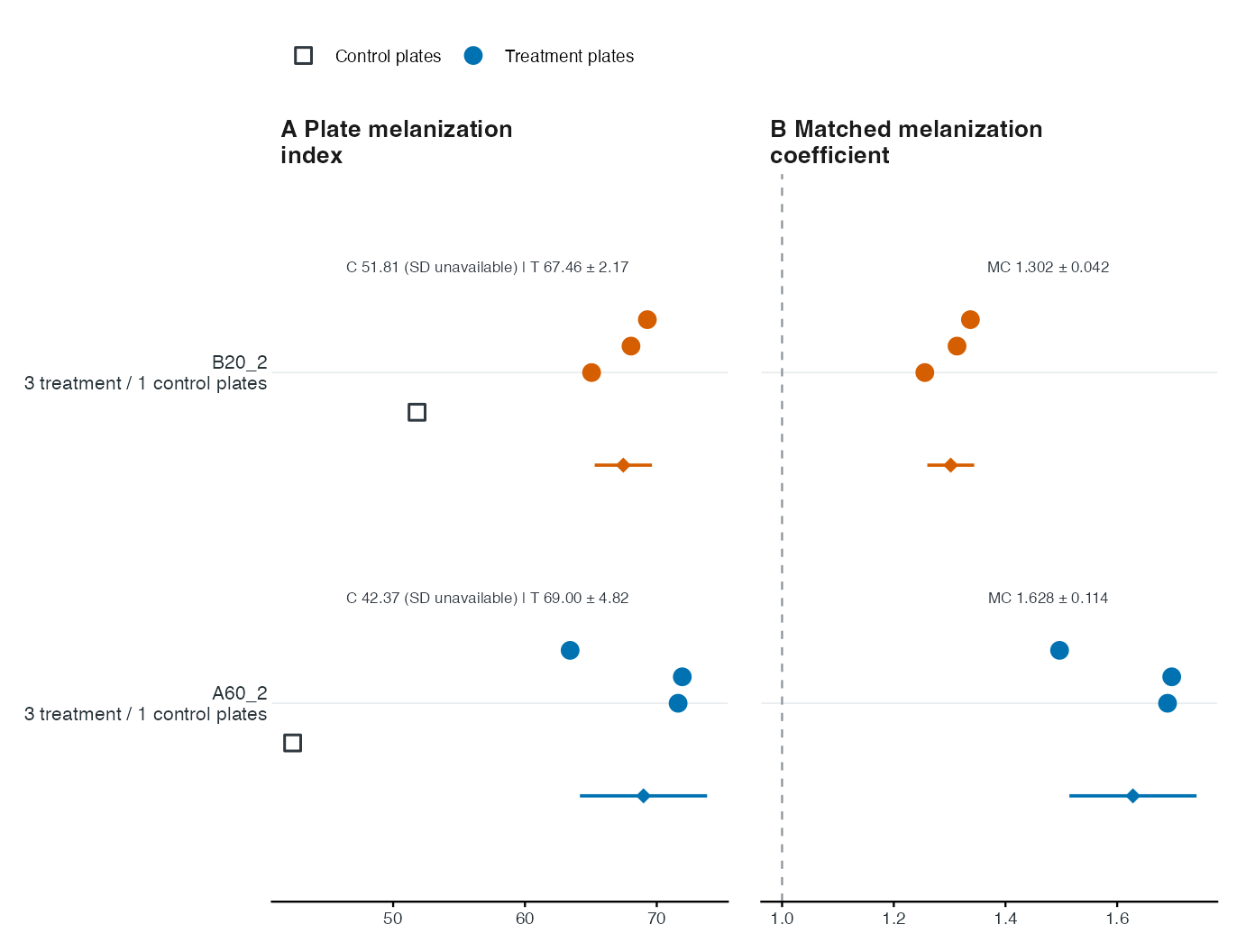
Descriptive real-data comparison. Each row uses that treatment’s own set control; these are image-darkness ratios under the illustrative calibration.
For your own project, a blank plotting result can mean that matching
assignments are incomplete. Check
reviewed14$comparison_status and
reviewed14$coefficient_error. When the status is
awaiting_design, plot_treatment_comparison()
reports why it cannot create a matched comparison; use the set-only plot
later in this article for descriptive measurements. After actual
matching assignments are supplied, finalize again before plotting. Do
not replace missing labels with guessed controls. A plot stored in a
variable must be explicitly printed in a script or loop.
You can also plot the finalized object already in memory:
print(plot_treatment_comparison(reviewed14))- Left panel: independent plate MI means. Squares are controls; coloured circles are treatment plates; lower diamonds are treatment means.
- Right panel: each treatment plate divided by its own set’s control mean, and the set-level ratio of means. The dashed reference line is MC = 1.
- Bars and printed ± values: one between-plate SD, not confidence intervals. Control SD is unavailable for a single control. Ratio SD conditions on the shared control mean and does not include its uncertainty.
- QC reminders: remain visible in the console and separate caption file; they identify checks to complete before reporting results.
Finalization already exported treatment_comparison.pdf,
.svg, .png and _statistics.csv
into the project folder. To create a named alternative:
plot_treatment_comparison(reviewed14,
  file=file.path(project14$project_dir,"my_14_day_comparison"),
  labels=c(A60_2="Fungal treatment A60_2",B20_2="Fungal treatment B20_2"))
PDF and SVG retain vector text and geometry; PNG is 600 dpi. Check the target journal’s final dimensions, font sizes and caption requirements. Changing display labels does not change metadata or statistical matching.
8. Close R, reopen the project and read saved tables
For a project saved in a durable folder, start a fresh session and
select its image_analysis.rds file. Read saved results
directly from that same folder:
library(FunMel)
saved_file14 <- file.choose() # Select image_analysis.rds in the project folder.
saved_dir14 <- dirname(normalizePath(saved_file14,mustWork=TRUE))
result14 <- readRDS(file.path(saved_dir14,"image_analysis.rds"))
reviewed14 <- readRDS(file.path(saved_dir14,"reviewed_analysis.rds"))
head(result14$spots)
print(plot_treatment_comparison(reviewed14))
This reads existing measurements; it does not repeat image analysis. Keep the complete project folder so the original and finalized results remain together.
For project-aware recovery, the optional
load_experiment() and read_experiment()
helpers reconnect moved project paths:
project14 <- load_experiment() # Select project.rds in its current folder.
result14 <- read_experiment(project14)
reviewed14 <- read_experiment(project14,finalized=TRUE)
After opening the project with load_experiment(), update
final outputs after correcting valid experimental annotations:
reviewed14 <- FunMel::finish_experiment(project14)Final outputs saved means this succeeded. It is
unnecessary to prepare the photographs again. Keep the complete folder,
including project.rds, metadata CSV and saved results.
load_experiment() reconnects moved internal paths. Saved
measurements can be read/finalized without the original photographs, but
a new image run still needs them. Missing metadata cannot be safely
guessed or rebuilt from image appearance. Changes affecting masks
require reanalysis.
9. Optional close-up measurements and specialist tools
Batch results keep tables and saved QC PNGs but drop large image arrays. For interactive image-level views, reprocess just one real photograph with images retained:
row14 <- metadata14[metadata14$plate_id=="2026_10_02_99_38",,drop=FALSE]
plate14 <- analyze_plate(file.path(project14$image_root,row14$relative_file),
  id=row14$plate_id,layout=layout_by_treatment(row14),dish_diameter_mm=dish_mm,
  max_dim=1200,n_spots=5,spot_radius_mm=0.4,n_boot=20,keep_images=TRUE)
plot_qc(plate14)
print(plot_profiles(plate14))
plot_melanization_map(plate14,type="2d")
The darkness map is not pigment concentration. For a different spot
count/radius,
sample_colony_spots(plate14,n_spots=3,spot_radius_mm=0.4)
demonstrates the sampling API; do not change compared responses
inconsistently. Calibration, classifier training and interactive
annotation examples are in the complete
function catalog. A classifier trained on synthetic teaching labels
is not validated for these photographs.
Find the exported files
| File | Contents |
|---|---|
| project.rds | Saved project paths for project-aware recovery |
| plate_metadata.csv | Editable experimental assignments, one row per plate |
| image_analysis.rds | Original measured tables and analysis status |
| colonies.csv, spots.csv, profiles.csv, plates.csv | Measurement tables |
| failed.csv | Failed-image reports; zero rows on a successful run |
| metadata_used.csv | Full metadata attached to the outputs |
| reviewed_analysis.rds | Finalized result; the name does not certify review |
| assessment.rds | Statistical/descriptive assessment and its status |
| melanization_coefficient.csv | Own-set ratios of treatment/control means |
| per_plate_coefficients.csv | Treatment plate ratios using own-set control means |
| coefficient_plate_means.csv | Independent plate means used in calculations |
| treatment_comparison.pdf/.svg/.png | Comparison exports |
| treatment_comparison_statistics.csv | Exact descriptive values plotted |
| treatment_comparison_caption.txt | Full interpretation, SD definitions, limitations and QC status |
| qc_review_status.csv | Recorded QC status |
| qc/ | One QC PNG per image |
| sessionInfo.txt | R, platform and package versions |
Different recorded day/strain/medium contexts create separate final
output folders and context_index.csv; do not pool
incompatible contexts. For your own photographs, follow the Get started workflow with your folder or ZIP and
correct segmentation layouts. Keep its own image identities and
experimental assignments. This article’s filenames and numerical results
refer only to the eight supplied photographs.
The installed script examples/walkthrough_14_days.R
follows the same numbered procedure. Precomputed tables in
extdata/14_day_example are documented in their
PROVENANCE.md. The steps above analyze the original
photographs.
Comparison captions are exported separately as
treatment_comparison_caption.txt. Use
caption="brief" or caption="full" in
plot_treatment_comparison() to include a caption beneath
the figure.
Using your own photographs without completing experimental labels
The bundled example has matching labels already supplied, so it
produces matched coefficients. Your own photographs can be measured even
when treatment, set and optional annotations are blank. Prepare a new
project, then run it directly. Unlabeled rows use the standard fungal
layout; use default_centre="none" for control-only
photographs. Mixed collections require the correct per-image
centre_model or known control labels so the appropriate
layout is used.
Finalization with an incomplete matching design saves measurements
with comparison_status="awaiting_design" and an explanation
in comparison_status.csv. It does not generate an
unsupported comparison figure. Complete the actual treatment and
own-control set assignments only when you need comparisons, then finish
again. Do not remeasure unless the image layout changes. No optional
strain, medium, date, notes or approval flags need filling merely to
measure images. Inspect QC before interpretation. All displayed table
examples use base R and knitr::kable(); no hidden tutorial
helper needs to be copied. You can also use
head(result$colonies) to inspect measurements
immediately.
Explore measurements by set, without treatment names
You can inspect measurements using only set_id and the
image identities. You do not need to name the treatments, fill optional
annotations or change approval flags. These commands work after
run_experiment(); they do not require a completed
coefficient calculation. For your own ZIP, first run the standalone
workflow below, then use its result14 and
project14 objects here.
First, count the photographs recorded in each set:
metadata14 <- read.csv(project14$metadata_file, check.names=FALSE)
knitr::kable(as.data.frame(table(metadata14$set_id)),
col.names=c("Set", "Photographs"), row.names=FALSE)| Set | Photographs |
|---|---|
| A60_2_14_days | 4 |
| B20_2_14_days | 4 |
Next, average the finite colony measurements within each independent plate, then summarize those plate means by set. Each plate receives equal weight; colonies and spots are subsamples rather than independent plate replicates. Inspect the QC images and resolve failed photographs before interpretation. Keep different days, strains, media and other experimental contexts separate; subset the colony table to a single context before running this summary if those contexts occur within the same set.
colony_table14 <- result14$colonies
usable14 <- colony_table14[
  is.finite(colony_table14$MI_mean) &
    !is.na(colony_table14$set_id) & nzchar(trimws(colony_table14$set_id)),
  c("set_id", "plate_id", "MI_mean")
]
plate_means14 <- aggregate(MI_mean ~ set_id + plate_id,
                           data=usable14, FUN=mean)
knitr::kable(plate_means14, digits=3, row.names=FALSE)| set_id | plate_id | MI_mean |
|---|---|---|
| A60_2_14_days | 2026_10_02_99_38 | 71.621 |
| A60_2_14_days | 2026_10_02_99_39 | 71.938 |
| A60_2_14_days | 2026_10_02_99_40 | 63.428 |
| A60_2_14_days | 2026_10_02_99_41 | 42.374 |
| B20_2_14_days | 2026_10_02_99_42 | 65.057 |
| B20_2_14_days | 2026_10_02_99_43 | 68.045 |
| B20_2_14_days | 2026_10_02_99_44 | 69.287 |
| B20_2_14_days | 2026_10_02_99_45 | 51.813 |
set_means14 <- aggregate(MI_mean ~ set_id, data=plate_means14, FUN=mean)
plate_counts14 <- aggregate(plate_id ~ set_id, data=plate_means14, FUN=length)
names(plate_counts14)[2] <- "n_measured_plates"
set_summary14 <- merge(set_means14, plate_counts14, by="set_id")
names(set_summary14)[names(set_summary14)=="MI_mean"] <- "mean_plate_MI"
knitr::kable(set_summary14, digits=3, row.names=FALSE)| set_id | mean_plate_MI | n_measured_plates |
|---|---|---|
| A60_2_14_days | 62.34 | 4 |
| B20_2_14_days | 63.55 | 4 |
You can plot those plate means without assigning treatment names:
# Keep individual plates visible; use the final figure's colours and typography.
set_order14 <- sort(unique(as.character(plate_means14$set_id)))
set_palette14 <- stats::setNames(
  rep(c("#0072B2", "#D55E00", "#009E73", "#CC79A7", "#E69F00", "#56B4E9"),
      length.out=length(set_order14)), set_order14)
if (length(set_order14)>6L)
  set_palette14 <- stats::setNames(
    grDevices::hcl.colors(length(set_order14), "Dark 3"), set_order14)

points14 <- plate_means14[order(plate_means14$set_id, plate_means14$plate_id), ]
points14$row <- match(points14$set_id, set_order14)
for (set14 in set_order14) {
  ix14 <- which(points14$set_id==set14)
  points14$row[ix14] <- points14$row[ix14] +
    if (length(ix14)>1L) seq(0, 0.18, length.out=length(ix14)) else 0.08
}
set_sd14 <- aggregate(MI_mean ~ set_id, data=plate_means14, FUN=stats::sd)
names(set_sd14)[2] <- "sd_plate_MI"
summary_plot14 <- merge(set_summary14, set_sd14, by="set_id")
summary_plot14$row <- match(summary_plot14$set_id, set_order14)-0.22
intervals14 <- summary_plot14[is.finite(summary_plot14$sd_plate_MI), ]
labels14 <- paste0(set_order14, "\n",
  summary_plot14$n_measured_plates[match(set_order14, summary_plot14$set_id)],
  " measured plates")

set_plot14 <- ggplot2::ggplot(points14, ggplot2::aes(x=MI_mean, y=row)) +
  ggplot2::geom_segment(data=intervals14, ggplot2::aes(
    x=mean_plate_MI-sd_plate_MI, xend=mean_plate_MI+sd_plate_MI,
    y=row, yend=row, colour=set_id), inherit.aes=FALSE, linewidth=0.65) +
  ggplot2::geom_point(ggplot2::aes(colour=set_id, fill=set_id, shape="Plate"),
                      size=2.6, stroke=0.8) +
  ggplot2::geom_point(data=summary_plot14, ggplot2::aes(
    x=mean_plate_MI, y=row, colour=set_id, fill=set_id, shape="Set mean"),
    inherit.aes=FALSE, size=2.7) +
  ggplot2::scale_colour_manual(values=set_palette14, guide="none") +
  ggplot2::scale_fill_manual(values=set_palette14, guide="none") +
  ggplot2::scale_shape_manual(values=c("Plate"=21, "Set mean"=18)) +
  ggplot2::scale_y_continuous(breaks=seq_along(set_order14), labels=labels14,
    limits=c(0.5, length(set_order14)+0.5)) +
  ggplot2::labs(x="Plate melanization index", y=NULL, shape=NULL) +
  ggplot2::theme_classic(base_size=9, base_family="sans") +
  ggplot2::theme(
    axis.line.y=ggplot2::element_blank(), axis.ticks.y=ggplot2::element_blank(),
    axis.text=ggplot2::element_text(colour="#263238"),
    axis.text.y=ggplot2::element_text(size=8),
    panel.grid.major.y=ggplot2::element_line(colour="#E8ECEE", linewidth=0.3),
    legend.position="top", legend.justification="left",
    plot.margin=ggplot2::margin(10, 12, 10, 10))
print(set_plot14)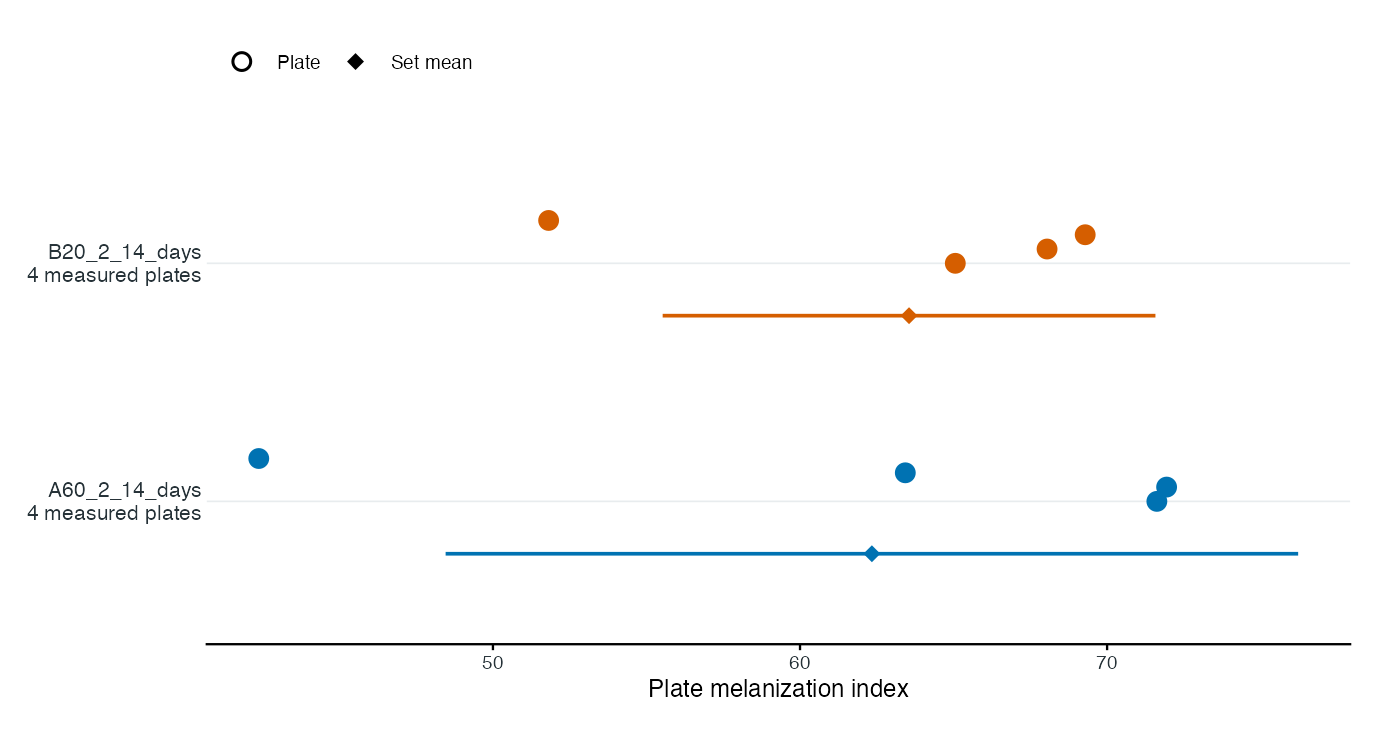
Circles show individual plates; the lower diamond shows the set mean. Bars show one between-plate SD, not confidence intervals, and are unavailable for a single plate. Colours identify sets, not treatment or control roles. This optional descriptive plot complements the two-panel matched-control figure in step 7; it does not replace it or infer treatment effects, coefficients or p-values. There is no caption embedded beneath either figure by default.
The plot displays in R and in this article. To save this optional figure, run:
for (ext14 in c("pdf", "svg", "png")) {
  ggplot2::ggsave(file.path(project14$project_dir,
                          paste0("set_measurements.", ext14)),
                 plot=set_plot14, width=7.2, height=3.8, dpi=600, bg="white",
                 device=if (ext14=="svg") grDevices::svg else
                   if (ext14=="pdf") grDevices::cairo_pdf else "png")
}
These are descriptive summaries of all measured plates in each set. If a set contains both control and confrontation plates, this summary includes both; it does not estimate the response to the interacting fungus. Blank set IDs are omitted, and plates without finite colony measurements are not counted. The count of successfully measured plates can therefore differ from the number of photographs in the metadata. Means based on incomplete colony detection need inspection as well.
set_id groups photographs but cannot identify which
member is the control. For matched melanization coefficients, record the
actual control in each set as treatment="control" and
identify the other plates with a treatment code. A short code such as
A60_2 is sufficient; a descriptive organism name is not
required. Confirm the appropriate per-image layout, including
centre_model="none" for control plates. If the layout
changes, remeasure; otherwise save the assignments and run
finish_experiment(project14) again. Without those
assignments, awaiting_design is expected: measurements are
available, but coefficient and treatment-comparison tables remain empty.
Do not call melanization_coefficient() until the matching
design is complete.
Standalone alternative: analyze your own 14-day ZIP
Use this complete alternative for your own archive, rather than
mixing it with the eight-photo example above. The ZIP is the input file;
the project directory is a separate new output folder. It must not be
inside the ZIP filename. Do not rerun preparation over an existing
project; reopen its project.rds with
load_experiment() instead, or choose a new output
folder.
library(FunMel)
photo_zip14 <- path.expand("~/Desktop/photos_14_days.zip")
project_dir14 <- path.expand("~/Desktop/FunMel_14_day_project")

# Reopen a prepared project; otherwise create it once from the ZIP.
if (file.exists(file.path(project_dir14, "project.rds"))) {
  project14 <- load_experiment(project_dir14)
} else {
  project14 <- prepare_experiment(
    input = photo_zip14,
    project_dir = project_dir14
  )
}

# Read existing measurements, or measure if this project has none yet.
if (file.exists(project14$result_file) || file.exists(project14$reviewed_file)) {
  result14 <- read_experiment(project14)
} else {
  # Replace 90 with the verified outer diameter of your dishes (mm).
  result14 <- run_experiment(
    project14, dish_diameter_mm=90,
    n_spots=5, spot_radius_mm=0.4
  )
}
result14$failed
head(result14$colonies)
head(result14$spots)
project14$qc_dir # Inspect all saved QC images before interpreting results.

# After resolving any failed photographs:
reviewed14 <- finish_experiment(project14)
reviewed14$comparison_status
comparison14 <- plot_treatment_comparison(reviewed14)
if (!is.null(comparison14)) print(comparison14)
project14$project_dir # Saved tables, analyses and any eligible comparison figures.
The two paths have different roles: photo_zip14 is the
existing photograph ZIP, and project_dir14 is the output
folder. "~" means your home folder;
path.expand() converts it to a full path.
file.path() joins folder names; it does not extract a ZIP
or turn a ZIP file into a directory.
The block above can be rerun: it reopens project.rds
when present and reads saved measurements when available. To import a
different ZIP, choose a new output folder; reopening an existing project
keeps that project’s photographs and metadata. To change the
segmentation layout, dish scale or spot settings, call
run_experiment() explicitly with the intended settings to
replace the saved image measurements, then inspect the new QC and
finalize again.
If the output folder is nonempty but has no project.rds,
keep its contents and choose another new output folder; do not delete
results to bypass the check. A failed assignment such as
project14 <- prepare_experiment(...) does not clear or
update an older project14 object. If preparation reports an
existing project, reopen its actual folder:
project14 <- load_experiment(path.expand("~/Desktop/FunMel_14_day_project"))
project14$project_dir
Replace the input ZIP path with the actual location on your computer.
A file chooser is an alternative:
photo_zip14 <- file.choose(). The example paths above
use the macOS Desktop; on other systems supply the correct full paths or
use the chooser and a new output folder under
path.expand("~"). The project14 object from
this block refers to your own archive, not the bundled eight-photo
example. Its photographs can have any supported filenames; do not reuse
the bundled example’s fixed QC-image names or expected coefficients.
Treatment, set and optional annotations can stay blank for
measurement. The fallback is a fungal confrontation layout. For
unlabeled control-only images, add default_centre="none" to
run_experiment(). Mixed collections require correct
per-image centre_model values or verified control
labels/folders. No manual approval flags or separate validation call are
needed. Missing matching assignments produce measurement-only outputs
with awaiting_design; add the real own-control assignments
only when comparisons are needed. All metadata columns are preserved. Do
not interpret a successful run as automatic biological validation; check
masks, layouts, calibration and warnings.
When coefficient tables are empty
Colony melanization index (MI) and the matched
melanization coefficient (MC) are different outputs. MI
is stored in colonies.csv (and individual spot MI in
spots.csv). MC divides treatment plate means by their own
set’s control mean. A coefficient CSV with headers but no rows means no
comparison was computed; inspect its recorded reason rather than
treating it as zero.
knitr::kable(result14$run_summary, row.names=FALSE)| File | What to check |
|---|---|
comparison_status.csv |
Why comparisons are withheld or whether finalization is complete |
metadata_issues.csv |
Actual plate IDs, missing/inconsistent design fields and next steps |
measurement_issues.csv |
Plate and colony IDs with missing MI or incomplete requested spots |
layout_assignments.csv |
The layout actually used, and whether it came from metadata or a default |
run_summary.csv |
Image failures, finite target MI counts, incomplete spots and comparison status |
An empty issue table means that no issue of that type was found by those checks; it does not establish biological validation. Diagnostic reports are separate from metadata: they do not overwrite custom annotations or approve any plate.
Understand the status before continuing
-
analysis_status="complete"means all photographs were processed without a whole-image failure. An expected colony can still be undetected. For example, 20 processed plates can contain only 79 finite MI values among 80 target rows. -
comparison_status="awaiting_design"means required matching assignments are missing or inconsistent. Treatment names may be simple codes; real controls must be identified within each set. Other annotations may remain blank. -
comparison_status="awaiting_measurement_review"means a target colony is undetected or has nonfinite MI. Check the named QC image and correct its input or layout before reanalysis. The package saves measurements and withholds comparisons rather than inventing or silently omitting the missing value. - Incomplete spots are reported separately. A colony with one of five requested spots can still have a valid whole-colony MI, but its requested spot summary is unavailable. Inspect masks and scale; use consistent feasible spot settings if remeasuring. Do not substitute a single achieved spot for five requested spots.
plot_treatment_comparison() explains the recorded reason
and returns no comparison plot when the design or target measurements
are unavailable. The set-only plot above remains descriptive and
requires inspection of incomplete plates; it does not solve missing
control assignments.
Assign controls from experimental records
The bundled eight photographs already have their design supplied.
Your own ZIP may contain different photographs or additional sets:
folder names such as A33_1_14_days identify a group but do
not identify its control. Do not apply the bundled control assignments
to unrelated images or guess that the last image in a folder is the
control.
For a design with one experimental treatment per set, users who want to use set names as treatment codes can select their actual controls explicitly:
project <- load_experiment() # Open the existing project.rds.
metadata <- read.csv(project$metadata_file, check.names=FALSE,
                     stringsAsFactors=FALSE)
print(metadata[c("plate_id", "set_id", "treatment")], row.names=FALSE)

# Select only independently verified control photographs; one or more per set.
control_ids <- utils::select.list(metadata$plate_id, multiple=TRUE,
                                 title="Select the actual control plate IDs")
if (!length(control_ids)) stop("No controls selected; metadata was not changed.")

# Appropriate only when each set represents one experimental treatment.
metadata$treatment <- as.character(metadata$set_id)
metadata$treatment[metadata$plate_id %in% control_ids] <- "control"
metadata$centre_model <- ifelse(metadata$plate_id %in% control_ids,
                                "none", "fungus")
validate_metadata(metadata) # Check actual matching before saving these assignments.
write.csv(metadata, project$metadata_file, row.names=FALSE, na="")
This optional selection is an experimental assignment, not an approval flag. The code deliberately uses set names as treatment codes. If a set contains several different experimental treatments, supply their distinct true labels instead. All other metadata columns are retained. Cancel selection if the control identities are unknown; measurements can still be explored.
Decide whether image reanalysis is needed
If you only correct treatment/set labels and the saved image layouts
were already correct, run finish_experiment(project) again;
it reuses measurements.
If actual controls were processed using fungus,
correcting those controls to none changes segmentation.
Save the corrected metadata and rerun image analysis,
inspect the new QC images, then finalize:
# Replace 90 with the verified dish diameter; keep the intended sampling settings.
result <- run_experiment(project, dish_diameter_mm=90, max_dim=1200,
                         n_spots=5, spot_radius_mm=0.4)
result$failed
result$run_summary
result$measurement_issues
project$qc_dir
# Resolve genuine failed/missing target measurements before interpreting comparisons.
reviewed <- finish_experiment(project)
comparison <- plot_treatment_comparison(reviewed)
if (!is.null(comparison)) print(comparison)
When a saved layout conflicts with a newly assigned control, the message names the affected plate IDs and explains that reanalysis is required. No missing measurement is filled from another colony or control, and no control is borrowed from a different set. Inspect the original photograph/QC when a colony cannot be resolved; software cannot establish a measurement for an absent or obscured target.