
START WITH REAL PHOTOGRAPHS
Prepare. Measure. Inspect. Compare.
Run eight original plate photographs through the complete workflow, using supplied treatment/control assignments and the final matched-control figure.
Follow the five steps below. The photographs and metadata are included.
The detailed real-data tutorial explains QC, measurements, statistics and exports.
Follow the own-ZIP workflow with your experimental assignments.
1. Install and load
Install once. After an update, restart R before loading FunMel. In RStudio, choose Session → Restart R.
install.packages("remotes")
remotes::install_github("mghotbi/FunMel")Source installation requires Xcode Command Line Tools on macOS,
matching Rtools on Windows, or R development tools and ImageMagick
development libraries on Linux. R >= 4.1 is required. To install the
tutorials for offline use, add build_vignettes=TRUE to
install_github().
2. Prepare the real-data example
Run these steps in order. The eight photographs contain two sets, each with three fungal confrontation plates and one control plate. The supplied metadata already identifies each plate’s treatment, own control and segmentation layout; no metadata entry or approval-flag edits are needed for this example.
photos <- system.file("extdata", "14-days", package="FunMel")
project_dir <- tempfile("FunMel_real_example_")
project <- prepare_experiment(input=photos, project_dir=project_dir)
project$project_dir
#> [1] "/private/var/folders/f1/f8pqw4_n4y90tlykbbhy3ztm0000gn/T/RtmpesXl4B/FunMel_real_example_3fdd7f1cd2d3"
tempfile() supplies a new temporary folder name, so
repeating the example creates a separate project without overwriting
earlier work. Keep the printed folder location: all outputs will be
saved there. To retain this practice run, copy the complete project
folder to a permanent location before closing R.
3. Measure and inspect
The 90-mm diameter below is an illustrative calibration. Verify the actual outer dish diameter before using measurements scientifically. The workflow measures the four target colonies on each plate and requests five circular spots per colony.
result <- run_experiment(
  project, dish_diameter_mm=90, max_dim=1200,
  n_spots=5, spot_radius_mm=0.4, n_boot=20
)
result$analysis_status
#> [1] "complete"
result$failed
#> [1] file  error
#> <0 rows> (or 0-length row.names)
project$qc_dir
#> [1] "/private/var/folders/f1/f8pqw4_n4y90tlykbbhy3ztm0000gn/T/RtmpesXl4B/FunMel_real_example_3fdd7f1cd2d3/qc"
The expected status is "complete" with zero failed
photographs. Open the printed QC folder and inspect the target-colony
masks, central fungal tissue and hyphae, sampling spots, scale and
lighting before interpreting results. result$run_summary
separates image completion from colony completeness;
measurement_issues.csv names missing colonies or incomplete
spot sampling. QC reminders do not require changing approval flags.
Resolve genuine failed photographs before finalizing. The 20 bootstrap
resamples keep this practice run quick; they are not intended for
precise uncertainty estimates.
Inspect the measurements directly:
knitr::kable(head(result$colonies[c("plate_id", "colony_id", "MI_mean")]),
digits=3, row.names=FALSE)| plate_id | colony_id | MI_mean |
|---|---|---|
| 2026_10_02_99_38 | TL | 70.448 |
| 2026_10_02_99_38 | TR | 72.105 |
| 2026_10_02_99_38 | BR | 74.293 |
| 2026_10_02_99_38 | BL | 69.635 |
| 2026_10_02_99_39 | TL | 71.186 |
| 2026_10_02_99_39 | TR | 68.283 |
knitr::kable(head(result$spots[c("plate_id", "colony_id", "spot_id", "MI_mean")]),
digits=3, row.names=FALSE)| plate_id | colony_id | spot_id | MI_mean |
|---|---|---|---|
| 2026_10_02_99_38 | TL | 1 | 71.710 |
| 2026_10_02_99_38 | TL | 2 | 74.014 |
| 2026_10_02_99_38 | TL | 3 | 69.632 |
| 2026_10_02_99_38 | TL | 4 | 68.491 |
| 2026_10_02_99_38 | TL | 5 | 76.129 |
| 2026_10_02_99_38 | TR | 1 | 71.611 |
4. Calculate coefficients and display the final figure
Finalization reuses the saved measurements and matches each treatment to its own set’s control.
reviewed <- finish_experiment(project)
knitr::kable(reviewed$melanization_coefficient[
  c("set_id", "treatment", "MI_treatment_mean", "MI_control_mean",
    "melanization_coefficient", "n_treatment_plates", "n_control_plates")],
digits=3, row.names=FALSE)| set_id | treatment | MI_treatment_mean | MI_control_mean | melanization_coefficient | n_treatment_plates | n_control_plates |
|---|---|---|---|---|---|---|
| A60_2_14_days | A60_2 | 68.996 | 42.374 | 1.628 | 3 | 1 |
| B20_2_14_days | B20_2 | 67.463 | 51.813 | 1.302 | 3 | 1 |
comparison <- plot_treatment_comparison(reviewed)
if (!is.null(comparison)) print(comparison)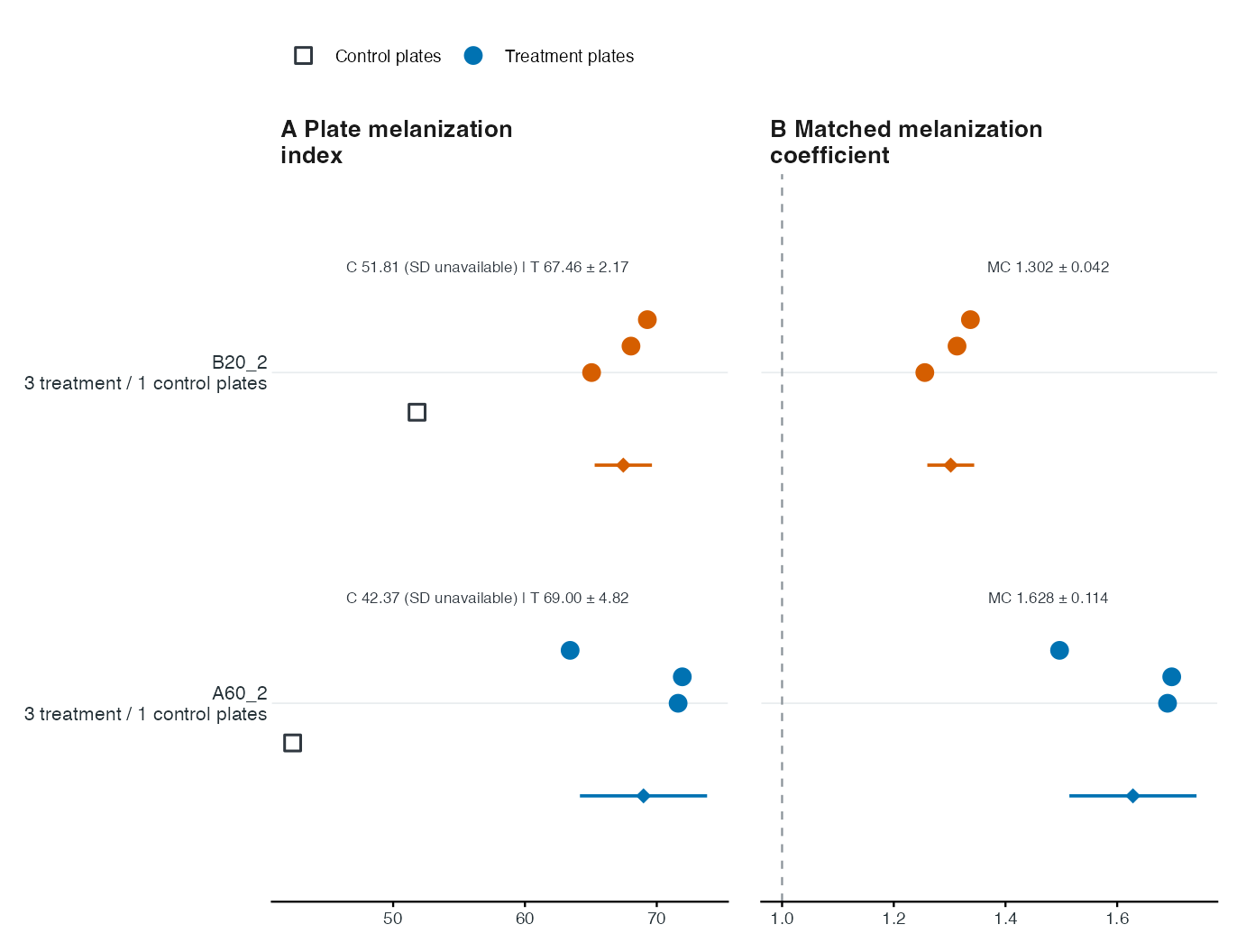
The left panel shows plate melanization indices; the right panel shows matched-control coefficients. Squares are controls, circles are treatment plates and lower diamonds are treatment means. Bars show one between-plate SD, not confidence intervals. Each set has only one control, so control SD and replicated-control significance tests are unavailable.
MI is 100 - CIELAB L*, an image-darkness proxy rather
than a direct measurement of melanin concentration. Colonies and spots
within a plate are subsamples; independent plates are the experimental
units. See the detailed real-data
tutorial for interpretation and limitations.
5. Find outputs and reopen saved work
project$project_dir
#> [1] "/private/var/folders/f1/f8pqw4_n4y90tlykbbhy3ztm0000gn/T/RtmpesXl4B/FunMel_real_example_3fdd7f1cd2d3"
This folder contains colony, spot, profile and plate CSV tables;
matched coefficients; saved R analyses; QC images; and the final
treatment_comparison.pdf, .svg and
.png. Statistics and the explanatory caption are saved
separately. The exported figure has no embedded caption by default.
After saving or moving the complete project folder, reopen it without preparing or measuring again:
project <- load_experiment() # Select project.rds in the saved project folder.
result <- read_experiment(project)
reviewed <- read_experiment(project, finalized=TRUE)
print(plot_treatment_comparison(reviewed))
Use your own photographs
Follow the own-ZIP workflow for separate input/output paths, preparation, reopening and measurement. Your photographs may have any supported names and any actual treatment codes; the bundled assignments apply only to the supplied photographs.
Measurements do not require treatment names or approval flags. A
mixed collection still needs correct per-image layouts:
fungus for confrontations and none for
controls. Matched coefficients need real treatment/control assignments
within set_id; otherwise measurements are saved with
awaiting_design. For exploration without treatment names,
use the set-only
measurement plot. Missing target MI instead produces
awaiting_measurement_review and identifies the affected
plate/colony. Use the real-data
troubleshooting guide for diagnostics, control assignment and the
correct reanalysis procedure. Every custom metadata column is
retained.
For specialist calibration, classification and measurement utilities, see the complete function examples.